QuickBooks®
Set up QuickBooks Discounts
Your FrameReady QuickBooks Integration supports Invoice-level or Line Item-level discounts.
Single Entry Discount
Invoice-Level Discount (Default setting)
-
By default, the FrameReady QuickBooks Integration is set up to send an Invoice-level discount that equals the total of all line item discounts (not an item by item discount). The discount applies to all items on the Invoice.
-
When you view your QuickBooks invoice, a single "lump-sum" entry for the discount is visible.
Itemized Discounts
Item-by-Item Discounts
-
The FrameReady Quickbooks Integration also supports an itemized listing of each discount. To enable this feature, in the Main QuickBooks Integration General Settings, set the Itemized Discounts field to Yes. See: Open QuickBooks Settings
-
A reminder "Designate at least one item with discount mapping" is displayed if the Itemized Discounts field is set to Yes (to associate FrameReady discounts with QuickBooks items).
-
If a discount item does not exist in your QuickBooks yet, then create one in QuickBooks and import the QuickBooks items again as described earlier.
-
All line item-level itemized discounts are required to be associated with a QuickBooks item. Doing so links each discount given in FrameReady with a "discount" item in QuickBooks and allows for better reporting. Example, total amount of 15% discounts for a given year vs. total amount of 25% discounts given in a year.
-
Find the "Discount" record in the list (you may have to create one in QuickBooks first and then run the import again).
-
The discount item's Show In Lists field should be set to No (because the discount should be selected at the line item-level on a FrameReady Invoice).
-
Also, in order for itemized discounts to work properly, the discount item's Default For Discounts field needs to be set to Yes.
-
-
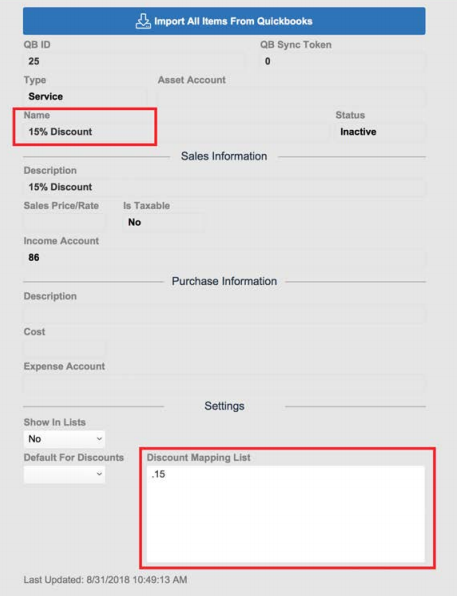
When tracking multiple discounts in QuickBooks, each discount item needs to be mapped to the discount amount from FrameReady. Use the navigation controsl to find the correct discount item and set the decimal equivalent in the Discount Mapping List field as shown below, e.g. 0.15
-
With itemized discounts enabled, each line item in FrameReady that has a discount is added as a separate line item in QuickBooks.
How to Link FrameReady Discounts to QuickBooks
-
In the QuickBooks Integration, click the Items sidebar button.
-
Use the built-in Find tool or use the navigation controls to locate each "Discount" record.
-
If you cannot locate the record, then a discount item does not exist in your QuickBooks yet. Create one in QuickBooks and then re-import the QuickBooks items.
-
The Show In Lists field determines whether or not the item appears in FrameReady (as an option when linking a FrameReady line item with a Quickbooks product and service).
All discount items should be set to No -- because the discount must be set per line item on a FrameReady Invoice. -
Also, in order for itemized discounts to work properly, the discount item's Default For Discounts field needs to be set to Yes.
-
The Discount Mapping List field is where you enter the percentage discount. For a 15% discount, enter .15
-
Continue until all discount records have been set.
Next Steps
Import Your Payment Methods
