QuickBooks®
Set up QuickBooks Payment Methods
Use these steps to setup your QuickBooks integration with FrameReady.
-
The payment method names could be different between Quickbooks and FrameReady.
-
As a result, in order to associate FrameReady payment methods with corresponding Quickbooks methods, your Quickbooks payment methods have to be imported and them matched to FrameReady names.
How to Enter the QuickBooks Setup Screen
-
Log in as level4 and Open the QuickBooks Settings.
-
When the QuickBooks Integration window appears, click the Gear icon (top right).

-
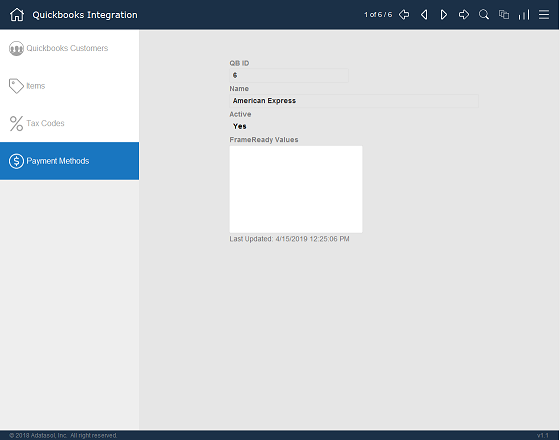
Choose Payment Methods in the left sidebar.
1) Import your QuickBooks Payment Methods
-
During initial set up, there are no QuickBooks Payment Methods listed. Click the Import All Payment Methods From QuickBooks button.

-
The integration connects to your QuickBooks account and the import process begins.
2) Review the imported Payment Methods
This step is not necessary for QuickBooks Online.
QuickBooks Desktop requires this step for pushing payments.
-
Use the top navigation controls to move through the records, or click the List View button to select a specific customer.
-
For each record, enter the FrameReady names of tender/payment methods into the FrameReady Values field.
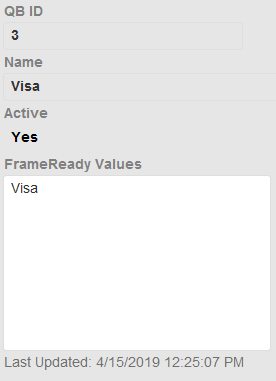
If multiple FrameReady Tender methods need to be mapped to the same Quickbooks Payment method, then entering multiple values is allowed: enter each value with a carriage return between the the individual FrameReady values. -
Continue until all payment records have been set.
Important Notes
-
If you delete a payment method in your Quickbooks, then you need to delete the corresponding payment method in the FrameReady Quickbooks settings and remap the payments as necessary.
-
Payment methods are imported from QuickBooks just like items. If you make a change to your payment methods in Quickbooks, then you need to delete them and reimport in FrameReady. That’s the way all those items work.
-
Items can be kind of a pain if you change them around because you will have to rematch them, too. If you delete stuff in Quickbooks, then it’s not going to automatically delete them in FrameReady.
