Price Using the Other Detail Window
The Other field allows for calculating odd items and adding them to a Work Order.
How to use the Other Detail Screen
-
From your Work Order, click the underlined Other button.

-
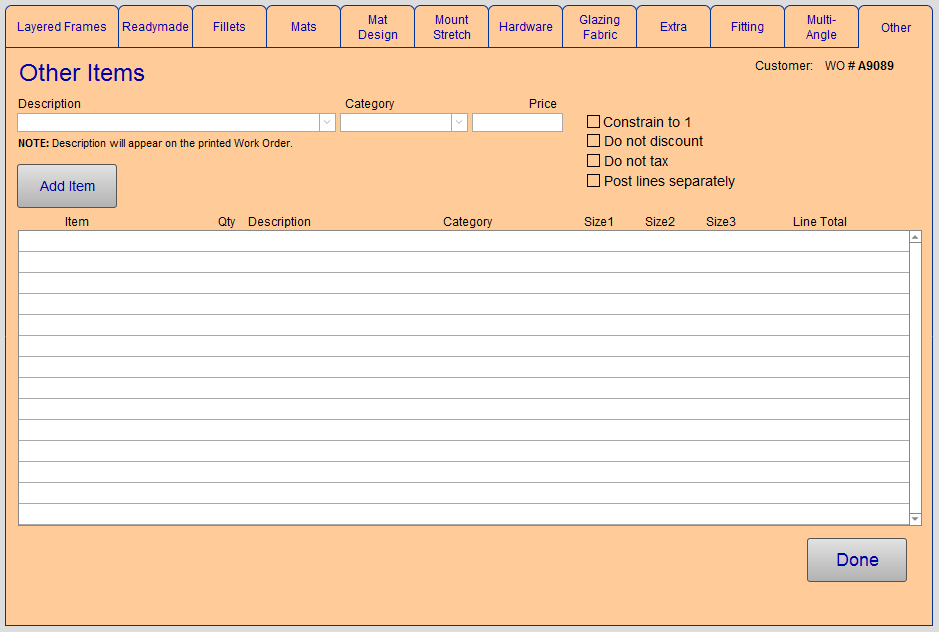
The Work Order Details window appears, with the Other tab opened.
-
Enter a description to identify what this"other" item is, e.g. shadow box. The description is used as a heading for mutiple items.
-
Click the Add Item button.
-
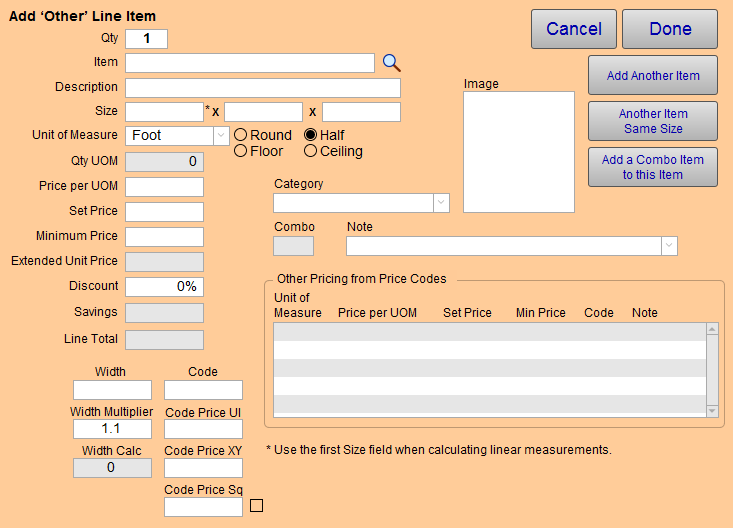
The Line Item Entry dialog window appears.
-
Adjust the Qty to match your needs, the default is 1 .
-
Either enter the Item name or use the magnifying glass icon to locate it from your Price Codes file.
-
Enter the dimensions of the item in the Size fields. The field order is: width, height, depth.
-
Optional: If the Price Code item has Other pricing, then, in the yellow table (lower right), the Otherpricing values appear. Choose a row and click to load in the Other price.
See also: Other Tab -
Adjust other fields as needed.
-
Click Done when complete.
© 2023 Adatasol, Inc.