Other Tab: All Groups
Use this tab to create tier pricing based on quantity or customer rather than giving a discount. These prices are only available in the Work Order's Other detail screen.
Other Tab Explained
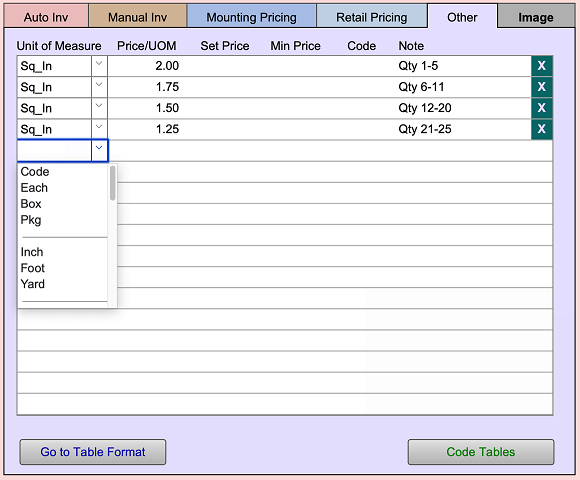
The Other tab in the Price Codes file (Moulding, Matboard, Fabric, MatDesign, Mounting, Hardware, Glass, Extras, Fitting groups only) is where you set up different parameters for use on the Work Order's Other field and detail screen.
See also: Other Detail Screen
Unit of Measure Field
-
Unit of Measure (UOM) options are:
Code, Each, Box, Pkg, Inch, Foot, Yard, Centimetre, Metre, Square Inch, Square Foot, Square Yard, Square Centimetre, Square Metre, Linear Inch, Linear Foot, Linear Yard, Linear Centimetre, Linear Metre, Cubic inch, Cubic Foot, Cubic Yard, UI, United Centimetre
Price List/ UOM Field
-
The current price per unit of measure.
Set Price Field
-
The optional dollar amount added to the calculated price.
-
It is a one time dollar value that is applied to each piece sold.
Min Price Field
-
The minimum price of an item. This dollar amount will only be used if the calculated price is less than the minimum retail price. Optional.
Code Field
-
Optionally, you may choose to price by code. It references the Code Tables below.
Note Field
-
A note field where you can classify different price structures
Go to Table Format Button
-
Displays the records in a full screen view. Click Done to close.
Code Tables Button
-
Takes you to the code tables screen where you may set up a new code table.
© 2023 Adatasol, Inc.