Add a Shipping Address
The shipping address appears on the printed Invoice and the printed Packing List, under Ship To.
You can store multiple shipping addresses and choose which to use when on the customer's Invoice.
How to Add a Shipping Address
Tip: You can also add a shipping address from the customer's Invoice by clicking the Shipping Address sidebar button.
Older invoices will still display the shipping address which was used when the invoice was created even if the address is no longer available in the Default Shipping Address list. This is to preserve the history showing where the item was shipped.
-
Locate the customer's Contact record and open the Shipping tab.
-
Click the Add a New Shipping Address button.
-
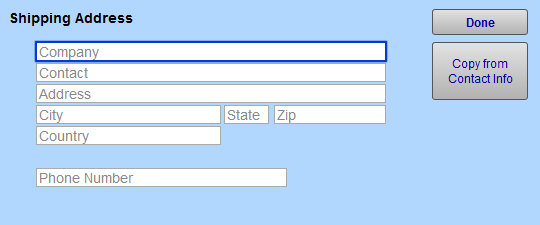
A window opens to collect information.
-
If the shipping address is the same as the customer's address (already added into FrameReady), then click the Copy from Contact Info button. Click Done.
Otherwise, enter in the shipping address. Click Done.
The new shipping address you have just added to the list will replace the previously selected Ship To: address at the top of the screen. To change the currently selected Ship To: address, click on the address line in the list of Default Shipping Addresses. -
To add additional shipping addresses, repeat from Step 2.
See also: Shipping Tab
© 2023 Adatasol, Inc.