Vendor Pricing Updates
Doing an Unattended Vendor Update
Save time when you update your vendors with the "process unattended" feature. Click one button and have all of your selected vendors updated to your specification without being in attendance at the computer.
-
Performing a vendor update ordinarily requires that you make decisions during the process. FrameReady's "process unattended" feature means you decide in advance and FrameReady handles the rest, requiring no input from you or answering dialog boxes.
-
This feature first requires setup. See: Set up Unattended Vendor Update
How to do an Unattended Vendor Update
The Vendor Update process is automated but not automatic: you are still required to click the Update Vendor Pricing button, choose a vendor to begin the download, etc.
Important: This process may take a long to complete, so we recommend starting it at the end of the business day.
-
At the end of the business day, click the Update Vendor Pricing button on the Main Menu.

-
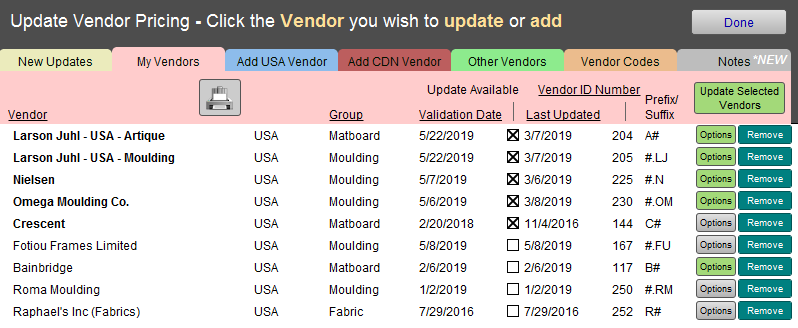
Your vendor list appears in the My Vendors tab; note that each vendor has an Options button. A green button has already been set up and a grey button has not.
-
Click the green Update Selected Vendors button (top right) on the Vendor Update window.

-
That's it! When you return in the morning the procedure will be finished.
