Setting Up Basics
Setting up your Work Order Options
FrameReady allows you to pre-select some information to appear in each new Work Order. Options may be set for:
-
automated entries of framing materials and matboard margins & reveals
-
interfaces with CMCs and Visualization software
-
editing of work order completion email message
-
set up of printing options
It is important to visit this screen when setting up FrameReady, especially to check the defaults settings and adjust them.
Caution: If you are operating FrameReady on a network, then these default settings must be set up on the Host computer, otherwise they will revert back to their original setting when you shut down.
Options Tab Explained
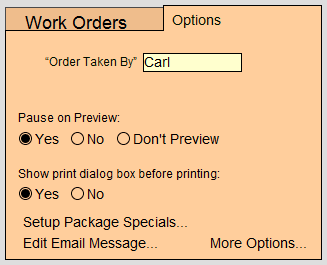
Order Taken By (Auto-Enter Sales Rep) Field
-
will appear on every new Work Order - making it ideal for a one person shop, see Bypassing the Order Taken By Message
-
Employee names may be listed on work order pop-up for easy selection. Click in the field and choose Edit...
Pause on Preview Radio Buttons
Check Yes to display a preview of the document and requires you to click the Continue button in order to present the Print Dialog box. This pause will allow you to also save the document as a PDF by clicking on "Save As PDF..." before it prints.
Check No to display a preview of the document, however, it will not pause but will either advance to the Print Dialog box or move directly to printing. This provides a faster option while still allowing you to verify the document before printing.
Check Don't Preview and FrameReady will not display a preview of the document. Instead, it will display a blank white area (if you have set the Print Dialog box to display on the screen), or it will simply cause the screen to flash briefly as it sends the document to the printer.
Show print dialog box before printing Radio Buttons
-
No - forces the document to be immediately sent to the printer without any further prompts. A faster option.
Setup Package Specials Button
-
The Setup Package Specials button directs you to a screen where any number of predetermined configurations, or framing templates, can be set up and then auto-filled on a Work Order simply by entering an abbreviation or code name.
Edit Email Message Button
-
The Edit Email Message button directs you to a screen where you can customize the Completion email sent to customers when their Work Order is completed.
More Options Button
The More Options button opens a new window with these tabs: