Getting Started
Congratulations! You now have at your fingertips a powerful pricing and management software: FrameReady.
Let’s get your software set up and ready for you to use!
Opening FrameReady
Open on Guest or Client (if you have multiple computers)
After Opening FrameReady
A message may appear “FileMaker cannot share a file because network sharing is turned off”
Follow these steps to stop this message from re-appearing each time you open FrameReady
From the Main Menu, click the Set Up Data button in the top right corner.
Open the Network tab.
If you are only using FrameReady on one computer, then click the Set Files to Single User button.
If you are using FrameReady on more than one computer:
Click the Enter Network Key buton.
Enter the network key provided to you in the installation email.
Click the Set Files to Multi User button.
Create a FrameReady Documents Folder
Create a folder in your Documents named FrameReady Documents
FrameReady uses this folder to create and store PDF documents.If you later get the error: [filename].pdf could not be created on this disk. Use a different name, make more room on the disk, unlock it or use a different disk. then look in your Documents folder and confirm there is a folder named FrameReady Documents
Each time you open FrameReady, you must enter your Account and Password
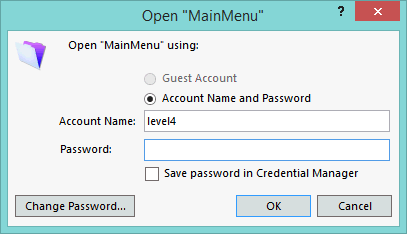
If the Account Name isn't level1 , level2 , level3 or level4 then backspace out what is there and enter your level.
To speed up this process, you can have the Account Name autofill (with a level of your choosing) so that you just need to enter the password. Here's how to do that in Windows:
Open with the level4 password. Click on Perform (in the menu bar at the top of the screen) and select Restore Full Menus from the pulldown menu. Click on Edit menu and select Preferences. In the User name field, enter your level. Eg. level2
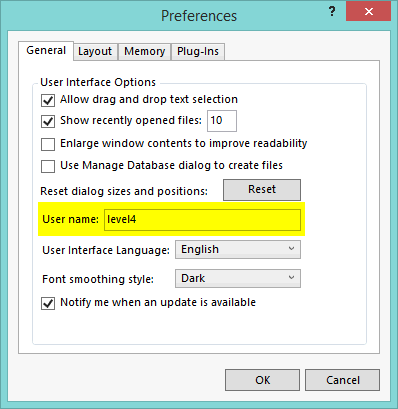
On MacIntosh:
Click on FileMaker Pro on menu in top left corner and select Preferences. Under the General (tab), in the User Name section, click in the Other field and enter your level, e.g. level2
Note: The default Accounts and Passwords can be found at the bottom of the download and installation web page.
Auto Zoom
If your screen resolution is capable, FrameReady can resize to a larger view
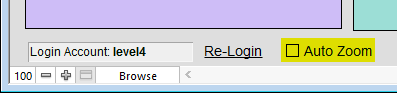
Click on the Auto Zoom box in the lower left corner. If your screen resolution is capable of enlargement, the window resizes to a larger view. If not, read these instructions or view on web: How to set up full screen view.
A minimum screen resolution of 1280 x 900 must be available for working with FrameReady. Higher resolutions allow for more records to be displayed when in a List View. You should not have to scroll up or down to view any of your FrameReady Form View screens.
On Windows, the Screen Resolution setting must be 100%.
On Windows, it is recommended that the task-bar not be selected to be always on top of other applications. To deselect this option, do the following:
Click Start button > Control Panel > Task-bar & Start Menu.
Uncheck the Keep the Task-bar on top of other windows option.
Click OK.
If the following message appears, “The date and time formats are different than the current system settings”, then always choose "File's Settings"
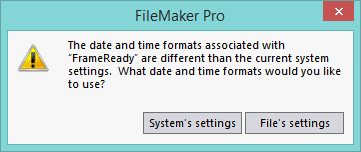
This message will continue to appear until you change the system settings in your computer.
Choose File's Settings.
Next, you need to change how your computer formats the current date:
Change the date format in Windows:
http://frameready.com/know/file-settings-vs-system-settings-on-windows/Change date format for Mac:
http://frameready.com/know/file-settings-vs-system-settings-onmacintosh/
Important Next Steps
Get Familiar with FrameReady
What is critical to set up in FrameReady first?
We've prepared a Set up Overview to help guide you.
Most people want to get their pricing set up first.
Your software arrives preloaded with your preferred vendor items and wholesale cost. You need to determine whether the default formulas meet your needs.
Start using the Work Order file right away. This will tell you whether you need to tweak the markups.
Then systematically go through your pricing items: moulding, matboard, mounting, glass, etc.
Make sure all the labor and procedures you offer, i.e. laminating, are entered as a Fitting item in the Price Codes file.
Moulding and matboard inventory can be set up later.
Enter any retail products you sell into the Products file.
Customer names and details can be entered as they come in and place their orders (if they were not imported from an existing customer database).
