Work Orders Tab
Tip: The Work Orders tab is located at the bottom far right of the Contacts file
-
Displays all Work Orders created for this contact. Data fields are auto-filled by the Work Order file; estimates identifiable in red.
-
This feature allows you to easily search for an old Work Order so as to Activate an estimate or to duplicate an order for the same or a different customer.
Work Orders Tab Explained
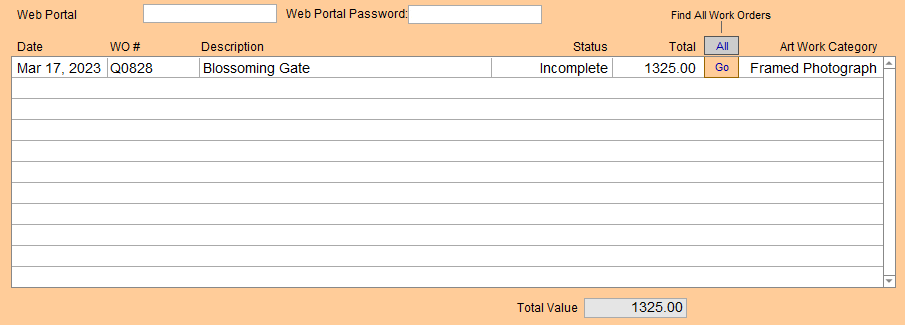
Most items in this tab are non-modifiable.
Web Portal
-
Username for the web portal; to view work orders.
Web Portal Password
-
Password for the web portal; shown in the clear.
Date Column
-
The date of the Work Order.
WO Column
-
The Work Order number.
Description Column
-
Notes concerning Work Order.
Status Column
-
Status of the Work Order.
Total Column
-
Dollar total of the Work Order.
All Button
-
Open all Work Orders in list view.
Go Button
-
Open the specified Work Order. Then click the Activate or Duplicate Work Order sidebar button, as required.
Artwork Category Column
-
The category of the Work Order art.
Total Value Field
-
The total value of all Work Orders and estimates; may or may not be posted to an Invoice.
-
The amount excludes taxes but does include discounts and multiple orders.
© 2023 Adatasol, Inc.