Price by Join
Certain mouldings and/or vendors may only be available as a join frame, also known as closed-corner frame. Therefore it is appropriate to select the order type as join.
Price Moulding by Join
-
If you have selected to order your moulding by Join (by clicking the Order Type radio button in the Frame Pricing tab), then FrameReady will look first in the blue Join cost field for an amount.
-
If the Join field is blank, then it will look in the Chop field. If it too is blank, then FrameReady will base your retail price on the amount in the Cost field (Length).
Note: Although suppliers may have an option for you to order their moulding as Chop and Join, they may not have provided Adatasol Inc with the wholesale costs for Chop and Join. This often happens when the wholesale cost of the moulding varies with the size of the frame you order. For example, an 8×10 frame is $5.00 per foot while a 34×40 frame is 4.10 per foot. This is a common practise for Canadian vendors.
-
If you set FrameReady to price (and order) your moulding by Join, then FrameReady will apply the default markup pre-entered in the program which is the Join wholesale cost multipled by 2 (Join x 2).
-
The default markups in FrameReady can easily be modified by clicking on the number and changing it.
-
To see how your change will affect the retail price you charge for this moulding, click the Reset button in the top right blue area. You can always undo the change and revert back to the default pricing by clicking the Look Up My Default button. Or, if you have modified the default, then you can insert the FrameReady defaults by clicking the Install Program Defaults button and select the button for: This Record, All Moulding, or Cancel.
-
In addition to the markups, all woods, liners, and extenders have an additional $5.00 added (Set Price) to the final price of the frame. All Fillets have $7.50 added to the final frame price. These valuse can be seen in the Set Price tab.
Minimum and Surcharges Tab
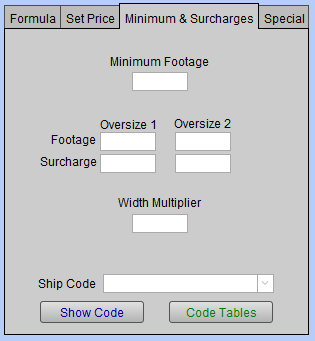
Under the Minimum and Surcharges tab are:
-
A Minimum Footage amount which is used to ensure that the retail price for small frames on the work order will not fall below the minimum charged by the supplier, e.g. 6 foot minimum.
-
Two separate surcharge Oversize percentages which is used to cover additional shipping charges for larger orders by adding a percentage increase to the retail price when the number of feet is exceeded, e.g. If the footage is more than 10 feet, then a surcharge of 10% will be added.
-
The moulding Width Multiplier which is used to add more footage to match a supplier chart or accommodate a waste heavy chop saw. If empty, the amount is calculated as 1. If entering an amount, it must be higher than 1, e.g. 1.25
-
The Ship Code field which is used to add shipping fees by a supplier. It presents a drop down list of available code tables. The shipping code is not added to the amounts in the Price Sampler.
-
A Show Code button which will display the values for the code you have selected in the Ship Code field. If empty, then the display will be empty. This is a fast way to view the code table without leaving the current screen.
-
A Code Tables button which is used to go to the Code Tables screen. If a Code Table is entered into the Ship Code field, then it will go directly to the displayed code. This is used when wanting to make changes to the Code Table sizes or retail prices or to create a new Code Table.
© 2023 Adatasol, Inc.