Price Codes Inventory List View
The inventory list displays additional fields that may be used when doing a physical inventory.
-
See also: Price Codes Form View, Price Codes List View
Price Codes Inventory List View
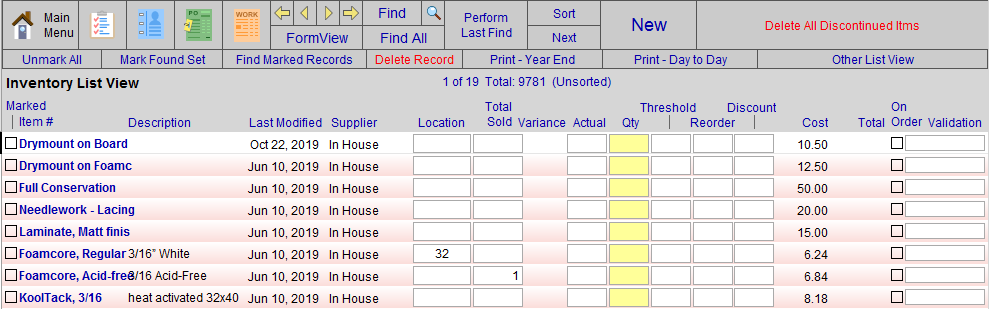
Marked Column
-
For use with Marked records. See: Marked Field
Item, Description, Last Modified, Supplier Columns
-
Only the Last Modified and Supplier fields can be changed here.
Location Field
-
The Location field is a drop-down list to identify where artwork is stored prior to framing, e.g. Bin1, Shelf2, Drawer3, etc. and to quickly know where the finished product is located, e.g. Ready1, Ready2, etc. or Ready for pickup.
Total Sold Field
-
The number of items sold since inventory was first entered.
-
When items are returned, the Qty is reduced.
Variance Column
-
The difference between the Qty field and the Actual. Large variances should be investigated.
Actual Field
-
Actual is used when you perform a physical inventory.
-
Quantities are entered into this field and a report is generated for year-end purposes.
Qty Field
-
Displays the available quantity.
Threshold Field
-
Used in conjunction with the Purchase Orders file.
-
When generating a Frame Order, FrameReady searches for items where the quantity is less than the amount in Threshold. This trigger value will automatically add a line to the Purchase Order for the vendor specified in Order From field.
-
Do not use a value of 0 (zero).
Reorder Field
-
The quantity to be ordered on a purchase order when the Qty is less than the Threshold.
Discount Field
-
Used to accurately reflect the true dollar value of your inventory.
-
If you receive a discount when purchasing this inventory, then enter the percentage in the Discount field. The total will be based on the discounted Cost shown.
-
A value here will not affect the price you charge your customers. Instead, the value is used to accurately reflect the true dollar value of your inventory.
Cost Column
-
The wholesale Cost field field of the item.
Total Column
-
The wholesale calculation of the amount in Qty multiplied by the value in Cost.
-
The total wholesale dollar value of the items listed on the screen is shown at the bottom of the column.
On Order Checkbox
-
A check indicates that the item has been added to a Purchase Order.
Validation Field
-
Displays the status of the data: Current, Not Verified, or Discontinued.
© 2023 Adatasol, Inc.