Invoice Details Tab
This tab shows the details of all the Contact's posted Invoices.
-
If a Work Order is present, then you may go to it by clicking the appropriate "Go" button.
Invoice Details Tab Explained
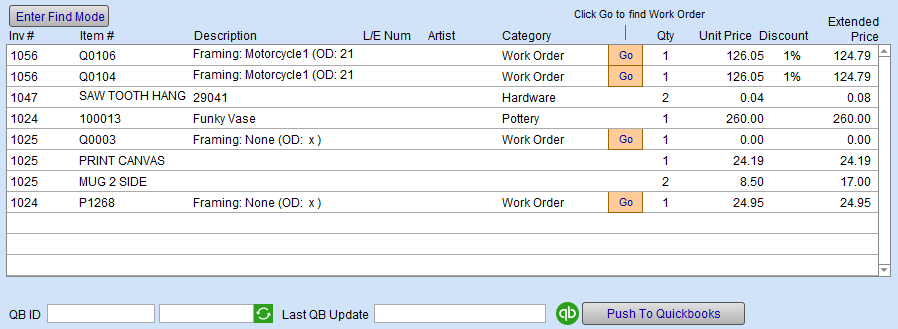
Enter Find Mode Button
-
Switches to find mode; perform a search on fields.
Inv# Column
-
The Invoice number.
Item# Column
-
The item number, as found in the Price Codes or Products file.
Description Column
-
The description of the Item.
L/E Num Column
-
The Limited Edition number of the print. Displayed if applicable.
Artist Column
-
Name of the artist. Displayed if applicable.
Go Button
-
Locates the associated Work Order so you can verify materials, dimensions or make changes to the order (or duplicate or create another for this customer).
Qty Column
-
Units sold
Unit Price Column
-
Price per unit sold.
Discount Column
-
The percentage of discounted applied to the line item. Displayed if applicable.
Extended Price Column
-
The calculated amount with Quantity and Discount applied. Displayed if applicable.
© 2023 Adatasol, Inc.