Email a Proposal
Send a PDF proposal to a customer by email.
How to Send an Email Proposal
-
Locate the Work Order you wish to send.
-
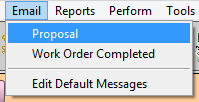
In the menubar, click Email and choose Proposal.
-
The email message appears.
-
Optionally edit the subject or message.
-
Click Send.
-
The Proposal document gives nothing but the total of the frame job; it includes no design details. This means customers cannot take the quote down the street to have your competition see your designs.
-
If you have set Fitting charges (labor) as non-taxable, then Fitting charges (labor) appears on a separate line on the Proposal. If you wish to not reveal the Fitting charges, it is recommended that you calculate and apply a dollar discount (instead of a percentage discount). The Fitting charges are added to the unit price and are not included as a separate line.
-
All Work Orders created for a customer on the same day appear as line items on the Proposal. To exclude specific Work Orders, use the Shop tab and assign a Job Number to the items to exclude and a different Job Number to the items you wish to include.
-
It may be used as a quote for an insurance claim or strictly as a frame quote. Of all the customer Work Order documents, the Proposal provides the least amount of information.
How to Set up your Proposal Message
© 2023 Adatasol, Inc.