Daily Summary Report
At the end of the day, when you are ready to transfer your totals to your accounting program, this report gives you all the information at a quick glance.
-
Cash Receipts include credit cards, direct payments, cheques and cash. These are payments received for Invoices created that day.
-
Charged refers to Invoices created that day which have a balance owing. The amount owed is added to your accounts receivable.
-
Received on Account refers to payments made on previously created Invoices. This amount is deducted from your accounts receivable.
How to Print a Daily Summary Report
-
On the Main Menu, click the Sales Reports button.
-
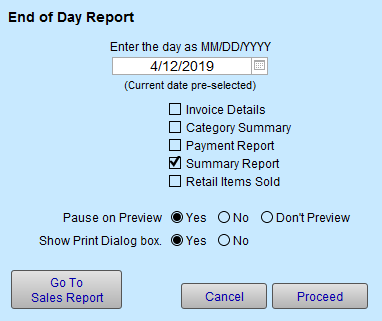
Click the End of Day Reports button.
-
Select Day using MM/DD/YYYY or use the calendar control.
-
Check the Summary Report checkbox.
-
Click Proceed.
-
Click Continue to print.

© 2023 Adatasol, Inc.