Code Pricing Tab
The Code Pricing tab allows for the pricing of moulding using the retail price matrix supplier by a few Canadian vendors.
Code Pricing Tab (for Moulding) Explained
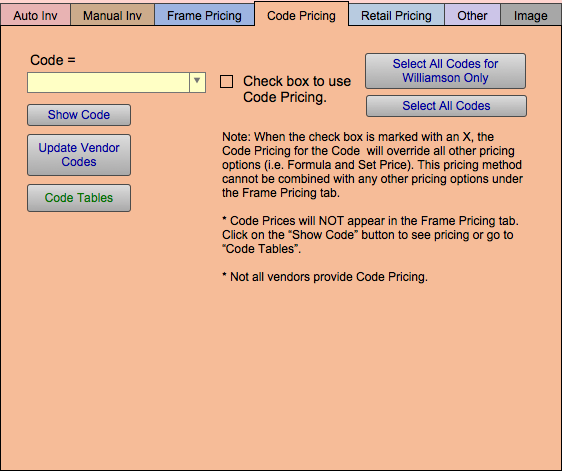
Code (equals) Dropdown Field
-
The vendor code currently assigned to the moulding record.
-
The Code field is where the vendor code is entered or selected. Vendor codes are usually supplied through the vendor pricing update program, but can be set up manually or even as a formula.
Check box to Code Pricing Checkbox
-
If you decide to price your moulding using the matrix, you will need to Check box to use vendor code matrix.
The Code Pricing you select will override all other pricing options (i.e. Formula and Set Price). This pricing method cannot be combined with any other pricing options under the Frame Pricing tab.
When enabled, the following appears across the top of the Moulding screen:
A Code is being used to price this moulding!
Important: Do not check this box if you wish to price your moulding by a Markup and Set Price.
Show Code Button
-
Reveals code pricing information, for selected Code, in a popover window. You may manually edit the price values for any entry.
Update Vendor Codes Button
-
Update all Canadian Vendor Matrix tables.
-
When clicked:
An Update Vendor Codes confirmation dialog box appears.
Click Continue.
Data Transfer and Import begins.
Code Tables Button
-
Manage the Code Table data and settings on a separate screen.
Select All Codes for [vendor] Only Button
-
Enable or disable all moulding from the specified vendor.
Select All Codes Button
-
Enable or disable all moulding with a vendor matrix code.
-
To select all records with a value in the Vendor Code field, click on Select All Codes.
A dialog box appears. Click on Enable if you wish to activate all codes for all vendors. Or click Disable to deactivate all records.
A Code Pricing Example Formula
Case(
Cost<0.99; “LW1″;
Cost<2.50; “LW2″;
Cost<4.00; “LW3″;
“LW4″)
Note: If the code contains any alpha characters, then the code must placed within quotes.
© 2023 Adatasol, Inc.