Block Days On Calendar
There may be days on which you do not wish to schedule jobs or have due dates fall on.
How to prevent Due Dates from falling on specific calendar days
The purpose of this feature is to prevent a Work Order's Due Date from falling on a day that you are closed. This feature is optional, e.g., if you would like all due dates to fall on Saturday, then put an X in that box only.
-
On the Main Menu, click the Setup Data icon (upper right).

-
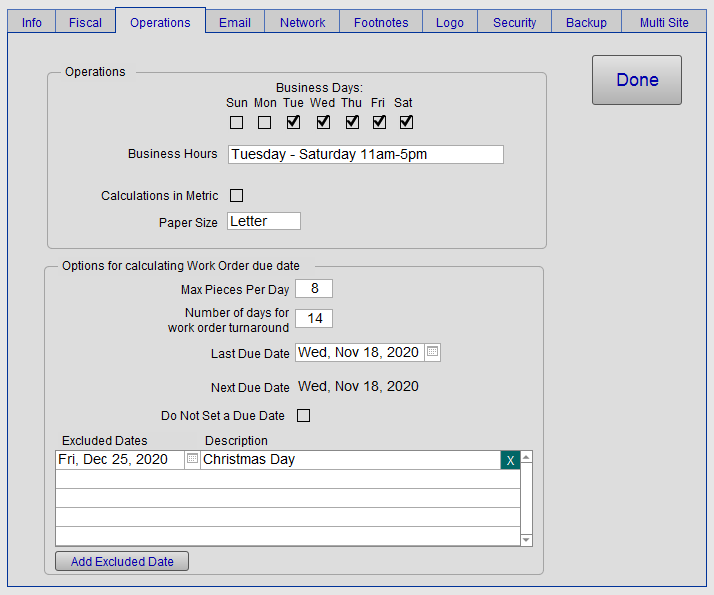
Open the Operations tab.
-
Select the days of the week your store is open. An X in the check box indicates the days your shop is open for business.
-
To add an excluded date, click the Excluded Dates button.
-
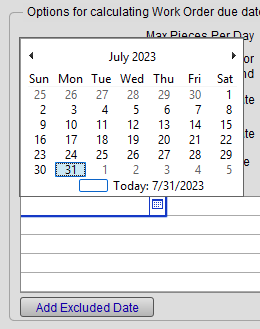
The cursor appears in the Excluded Date field. Use the calendar icon to select a date.
-
In the Description field, enter the reason to exclude this date, e.g. Holiday, etc.
-
Click Done to return to the Main Menu.
Note: If a due date falls falls on an excluded date, then it will be automatically replaced with the following work day.
© 2023 Adatasol, Inc.