Invoices
Clear Bad Debt and Reclaim Your Taxes
It happens to everyone now and then: a bad debt. The big question is, how do you get it off your books, out of your accounts receivable, zero it out, and reclaim the taxes you paid on it?
-
First, you may need to enter the term "Bad Debt" into the Tender field on the Invoice file.
-
Then, you need to zero-out the old Invoice and create a new Invoice to reclaim your taxes.
How to Write Off a Bad Debt Invoice
You have created an Invoice several months ago and the customer has never paid any amount to you. The two major steps are:
-
Take a payment (as Bad Debt) on the current Invoice to get it to a zero balance.
This clears it from your Accounts Receivable. -
Then, create a new Invoice for the same product/order with a negative symbol in front of the quantity, e.g. -2 . Enter a payment (Bad Debt) on this Invoice, it should be a negative payment this time.
This allows you to reclaim your taxes on this day.
Step 1) Write-off Bad Debt Invoice
-
In the Invoice file, locate the customer’s invoice which is a bad debt and needs to be written off.
-
In the Line Item Entry screen, click the Enter A Payment button.
-
In the Receipts dialog box, select the Tender: Bad Debt .
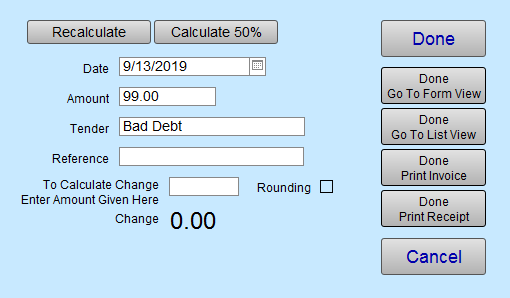
If you do not see it in the list, then scroll down to the bottom of the list and click Edit. This will allow you to add, Bad Debt, to the list. -
Click Done Go To Form View.
The full amount of the Invoice is paid with Bad Debt and the balance is now zero. -
In the Invoice Notes field, enter a note explaining that this is a bad debt and has been written off.
-
Take note of the invoice number, customer name and item sold on this bad debt invoice.
These steps remove the Invoice from your accounts receivable list.
Step 2) Zero-out the Bad Debt and Reclaim the Taxes
-
Create a new Invoice and enter the customer’s name or ID number.
-
Use the magnifying glass icon to enter the Product or Work Order number so that the same item(s) appear on this invoice as they appeared on the previous invoice.
-
Enter negative value in the Qty field (e.g. -1, -2, -3).
The subtotal appears in red and is a negative numbers. -
Click the Enter A Payment button.
-
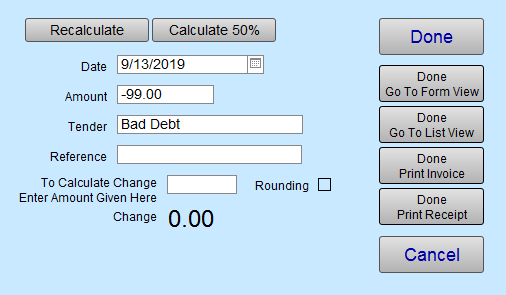
The Receipts dialog box appears. Select Bad Debt from the Tender list. It, too, will be a negative number.
-
Click Done Go To Form View.
-
In the Note field (lower left corner), document the reason this invoice was created.
For example: Created to correct bad debt on invoice #10025. -
This generates a tax credit for you on today’s sales.
You now have two Invoices for the same customer. Both with a zero balance. -
Go back to the original invoice and enter a similar note identifying the new invoice you created to reclaim the taxes. e.g. See invoice #10097 reclaim taxes on bad debt.
Note: In the Payment report, you will see Bad Debt listed, as a tender, with the same amount of money being paid and removed so that the total is zero.