Setting Up Basics
Set up Business Information
Enter information pertaining to basic areas of your business.
Info Tab Explained
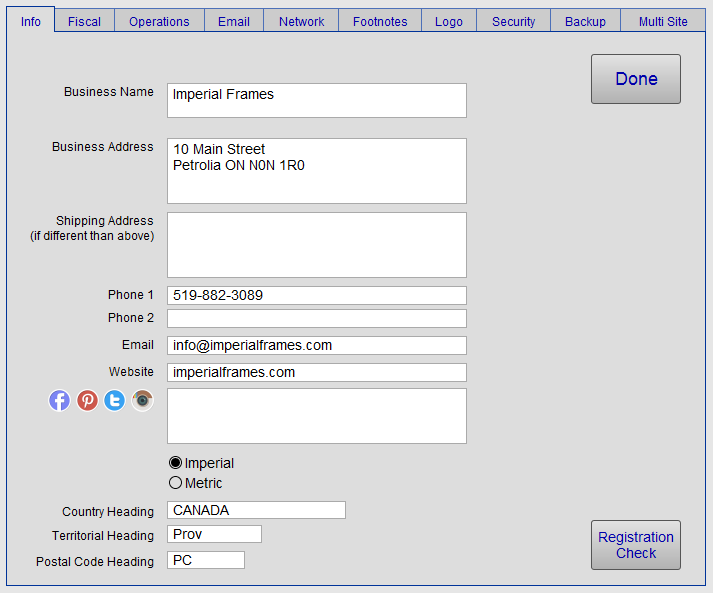
Business Name Field
-
Enter your Business Name on one or two lines. This is how it will appear in all printed documentation if a Logo is not used.
Tip: You can format text (font, size and color) from Menu Bar > Format or select some text and right-click.
Business Address Field
-
Enter your Business Address on two lines: street address on first line, the remainder on the second.
Shipping Address Field
-
Enter your Shipping Address only if it is different from the above Business Address. Otherwise, keep it empty.
Phone 1 and Phone 2 Fields
-
Enter your Phone number. You may use Phone 2 for fax.
Email Field
-
Enter your business email address. It will appear on printed customer documents.
Website Field
-
Enter your business website address.
-
Appears on printed customer documents.
-
Start with "www" and do not include "http://"
Social Media Field
-
Enter your social media links, e.g. www.facebook.com/your-fan-page
Imperial / Metric Radio Button
New in FrameReady 12 - support for both imperial and metric measurements and calculations.
-
Select the unit of measurement. This is a required field.
-
If left empty, then FrameReady cannot display the measurement data for Mat Margins, White Space, Reveals, etc.
Headings Field
-
Select the appropriate headings for your Country, Territory and Postal/zip code.
-
Sales taxes are calculated based on the selection in the Country field (not the Metric or Imperial radio buttons).
-
If the country is: USA, UK or Canada, then the taxes are added to the subtotal. ie $10 + 1.30 = $11.30
-
If the country is AUS, then the tax is NOT added to the subtotal. ie $10 + 1.30 = $10
-
-
Click Done to return to the Main Menu, or select another tab.
