Gift Certificate / Store Credit
Give a Customer Store Credit
Sometimes you need to add Store Credit to a customer's account.
How to Manually give a Customer Store Credit
-
Go to the Gift Certificates file and click the New Gift Certificate button.
A unique serial number is generated, for example, GC00522. -
Either choose an existing customer or use the New Customer sidebar button.
Store credit must always be linked to a Contact. -
In the Category drop-down menu, choose Store Credit.
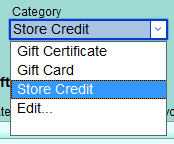
This is a required step! -
Enter in the dollar Amount of store credit.
-
For proof of issuing the store credit: click the Print Store Credit sidebar button and choose to print or save as a PDF.
Tip: When you view the Credits tab for this Contact, the store credit data appears.
Tip: When you create an Invoice and Enter a Payment, FrameReady generates an alert: A credit was found for this customer. Would you like to apply it to this invoice?
