Contacts
Shipping Tab
New in FrameReady 11: Multiple Shipping Addresses
Shipping Tab Explained
Important Notes
If the shipping address is different than the Contact’s address, then click the Add a New Shipping Address button.
This information also appears on the Invoice > Shipping Address sidebar button.
The shipping address appears on the printed Invoice and the printed Packing List, under Ship To.
Default Shipping Address for this Contact
Use the Clear button to reset the default shipping address to empty.
The address is not deleted from the program; it can be re-instated in the Select a Default Shipping Address section.
Add a new Shipping Address Button
Use to create a shipping address.
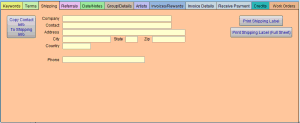
The available fields are: Company, Contact, Address, City, State, Zip, Country, and Phone Number.
Click Copy from Contact Info (this copies the contact address and pastes into the shipping address fields) or Done.
Edit Button
Click to make changes to the shipping address. Click Done when complete.
X Button
Click to remove the entire shipping address line.
Important: Address changes made here in the Contacts file transfer to the Invoices file but not vice-versa.
Print Shipping Label Button
Requests the starting position for the label and then prints.
Print Full Page Label Button
Prints an 8.5 x 11" label with your return address included.
How to Add a Shipping Address
See also: Add a Shipping Address